
An online booking website under your brand
Renthelp launches a complete booking website for your rental company: the customer picks a car, dates and location, chooses extras, accepts the consents and places the booking. Your logo, your colors, and an address you set yourself.
14 days free, no credit card required

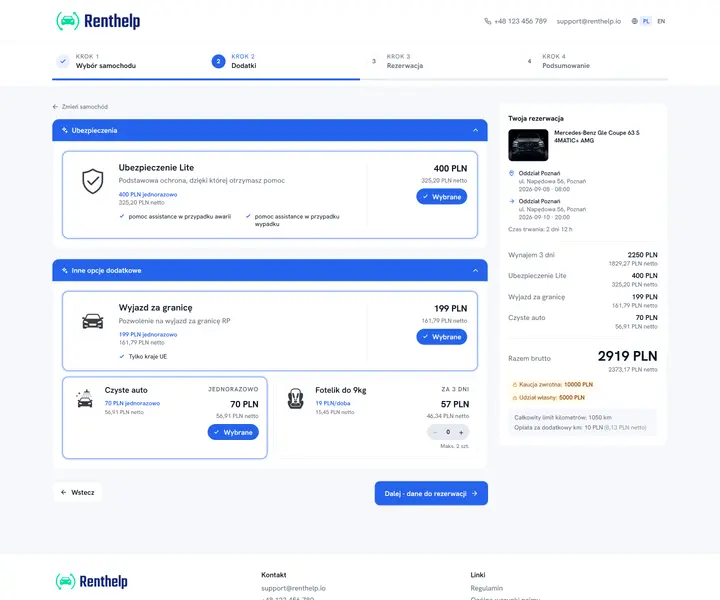
Booking in four steps
The process is guided step by step and works the same on a computer, tablet and phone. The customer sees the final price the whole time. If you want to weed out no-show bookings, turn on a required prepayment. An unpaid booking cancels itself and the dates go back into the pool.
Car selection with filters
The list shows only cars free on the selected dates, and when there are none, it suggests the nearest available date
Price known from the start
The rental amount, deposit and mileage limit are visible before booking
Pay at pickup or prepay
By default by card or cash on site; you enable online prepayment in the settings
You approve the booking
You confirm the dates and send the agreement by email; with a required prepayment, the recorded payment does it for you
You set everything up in Renthelp
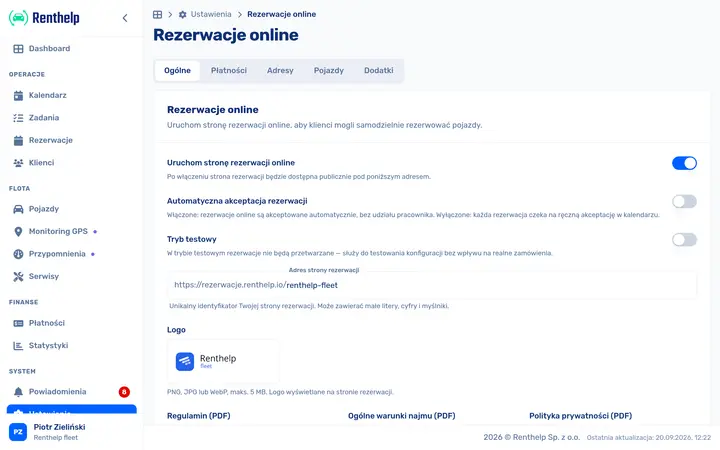
The booking website needs no developer and no separate hosting. You configure it in Renthelp and changes are visible right away.
Logo and brand colors
Set the logo, primary color and theme of the website
Documents and consents
Attach your rental T&Cs, terms of service and privacy policy, plus the required consents
Pickup and return locations
Define the points where customers pick up and return the car
Fleet on the website
You choose which cars appear on the website and in what order
One link, many channels
The booking website is an ordinary web address, so it works anywhere you can paste a link. You don't need your own website for it. For many rental companies it is the only website they use.
Instagram and Facebook
Put the link in your bio or add a booking button to your business profile
Google Business Profile
Customers find you in Maps and book without a single phone call
QR code
A sticker at the pickup point or on the car leads straight to booking
Classifieds sites
Add the address to your listing so customers can check availability and price themselves
Email and SMS
Send the link to regular customers instead of arranging dates over the phone
Your current website
If you already have a website, link to booking from the menu or a button
Booking website or widget?
Both options take online bookings and both are included in Renthelp. They differ in where the booking process lives.
| Feature | Booking website | Widget |
|---|---|---|
| Who it's for | You have no website or want a separate site for sales | You already have a website and want to add booking to it |
| Where it runs | A standalone website at its own address | A snippet embedded in your existing website |
| Scope of the process | All four steps: car, extras, details, summary | Date selection and handoff to booking |
| Look | Logo, colors and color themes of the website | Adapts to your website |
| Setup | Set up in Renthelp, no developer needed | Pasting a single snippet |
See a live booking website
A demo with a real fleet and the full booking process
rezerwacje.renthelp.io
From zero to your first online booking
Create an account
Signing up takes a few minutes and requires no credit card
Add your fleet and prices
Fill in your cars, rates, and pickup and return locations
Set up your brand and documents
Upload your logo, pick your colors and attach your T&Cs and consents
Publish the website
Share the address with customers or add a link from your own website
Frequently asked questions
Answers to the questions we get most often about the online booking website.
Do I need my own website?
No. The booking website is a standalone site and works even if your rental company has no website at all. All you need to do is share its address with your customers.
What address does the booking website run at?
The website has its own address on Renthelp, which you set yourself, for example rezerwacje.renthelp.io/your-rental. Running the website on your rental company's own domain is possible on the Enterprise plan. Get in touch with us.
Does the customer pay right away when booking?
That's up to you. By default the rental is paid for at pickup, in cash or by card, and that is what the booking confirmation tells the customer. You can also turn on online payment: either case by case when confirming a booking, in which case the customer gets a payment link by email, or permanently as a required prepayment. The booking then waits for payment and is confirmed only once the payment has been recorded. The prepayment is a percentage of the booking value, not a fixed amount. Both options require a connected payment gateway.
Does the website work on a phone?
Yes. The whole booking process is adapted to phones and tablets, and the customer sees the current price at every step.
Which languages does the booking website support?
The website supports Polish and English. The language is detected automatically, and the customer can change it at any time.
How is the booking website different from the widget?
You add the widget to your existing website with a single snippet. The booking website is a separate, complete site under your brand that guides the customer through the whole process until the booking is placed.
Will my rental terms and consents be included?
Yes. Your rental T&Cs, terms of service and privacy policy are attached to the website, and the customer accepts the required consents before placing a booking.
Start taking online bookings
Launch a booking website for your rental company and let customers book cars at any time of day.
14 days free, no credit card required
Simple, predictable pricing See full pricing →