
Agreements, handover reports and addenda without printing
Renthelp builds the rental agreement from the reservation data, the customer signs it on a phone or tablet screen and gets a PDF copy by email. Handover and return reports are created the same way, and so are addenda when the reservation changes.
14 days free, no credit card required

Less work every time you hand over a car
No retyping
Customer, car, dates, price, deposit and mileage limit go into the agreement straight from the reservation
No gaps in the agreement
You can't generate an agreement while the customer's details are missing something, such as a driver's license or an ID document
Verified phone number
Before signing, the customer enters an SMS code sent to the phone number from the reservation
The customer gets a copy right away
The agreement, handover reports and addenda go to the customer by email as a password-protected PDF
No disputes over damage
At return you see the damage found at handover and the new damage, with photos
Excess mileage, calculated for you
The return report counts the kilometers over the limit and adds the surcharge to the reservation's payments
An agreement signed on screen
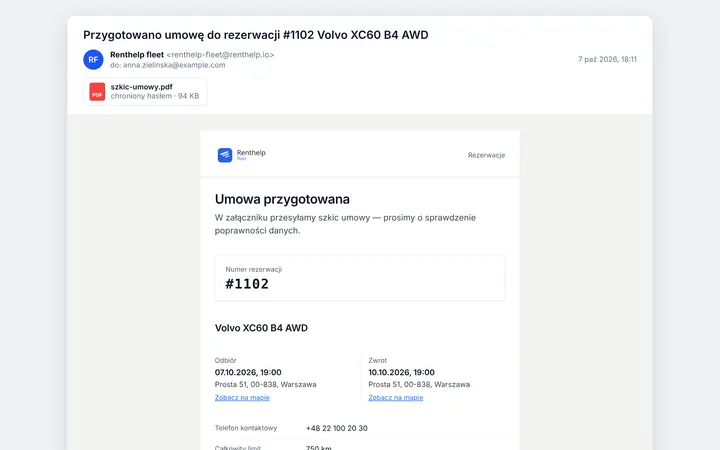
You generate the agreement in the reservation, and the customer immediately gets a draft by email to check. When handing over the car, you go through the reservation details together, the customer enters the SMS code and signs on the rental company's phone or tablet.
Draft agreement by email
The customer checks the details in the agreement before coming to pick up the car
SMS code before signing
The code is single-use and valid for an hour. Authorization can be skipped
Customer and employee signatures
The customer's signature is required, the employee's is optional
Password-protected PDF copy
The password is the customer's PESEL number or, if it was not provided, their driver's license number
Which documents are created at each stage
Each document is created in the reservation at the moment you carry out the given step. The customer gets it by email, provided their details include an email address.
| Stage | What you do in Renthelp | What the customer gets |
|---|---|---|
| Reservation | You generate an electronic or a paper agreement | A draft agreement as a PDF to check, for an electronic agreement |
| Signing the agreement | You check the details with the customer, send the SMS code, and the customer signs | A copy of the signed agreement |
| Car handover | You fill in the handover report: mileage, fuel, damage, cleanliness, photos, payment and deposit | The handover report and links to photos of the car |
| Reservation change | You change the return date or location, the price, terms or extras, approve it right away or send it to the customer for acceptance, and the system prepares an addendum | A copy of the signed addendum |
| Car return | You fill in the return report, and the system calculates the kilometers driven and the excess mileage | The return report and links to photos of the car |
The car's condition at handover and return
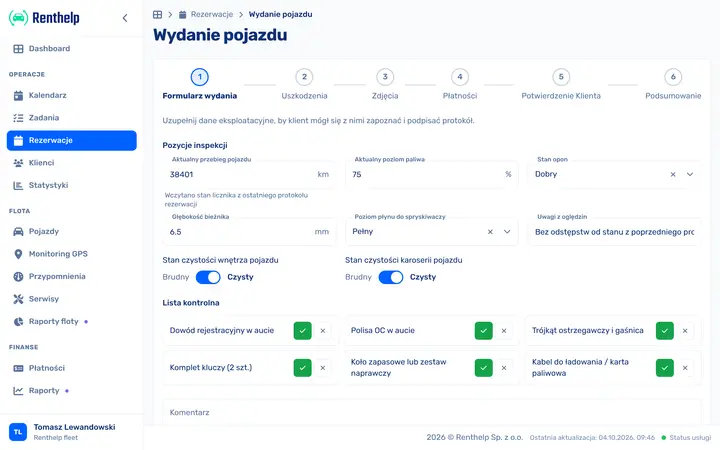
You fill in the handover and return reports step by step on a phone or tablet. The odometer reading is suggested from the previous report, and you mark damage on a drawing of the car. An inspection template adds readings and a checklist, both of which you define yourself, to the report.
Your own inspection template
Items to read off, such as the oil level, and a checklist, such as a fire extinguisher or a full set of keys
Damage diagram
You mark damage on the drawing of the car, with its severity, type and a photo on which you circle the spot
Existing and new damage
At return you see what was there at handover, what is new and what has been repaired
Mileage surcharge
Kilometers over the limit times the rate from the quote go into the reservation's payments
Rental extension with an addendum to sign
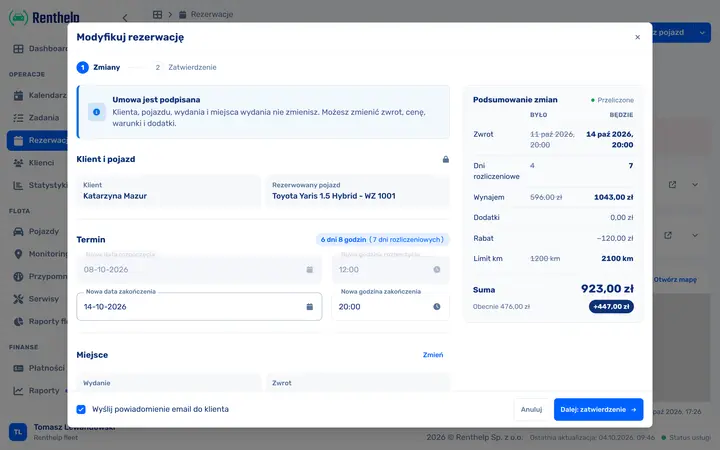
Once the agreement is signed, you change the return date, price, terms or extras in the reservation. Renthelp shows what will change, recalculates the quote and prepares an addendum, which the customer signs the same way as the agreement.
What stays and what changes
After the agreement is signed you can't change the customer, the car or the pickup. You can change the return, price, terms and extras
Before and after
Before saving you see the new return, billing days, rental amount, mileage limit and surcharge
Customer acceptance
You approve the change right away or send it to the customer, who confirms it with an SMS code
Addendum with a copy by email
The customer signs the addendum on screen and gets a PDF copy by email
Your agreement template and your terms
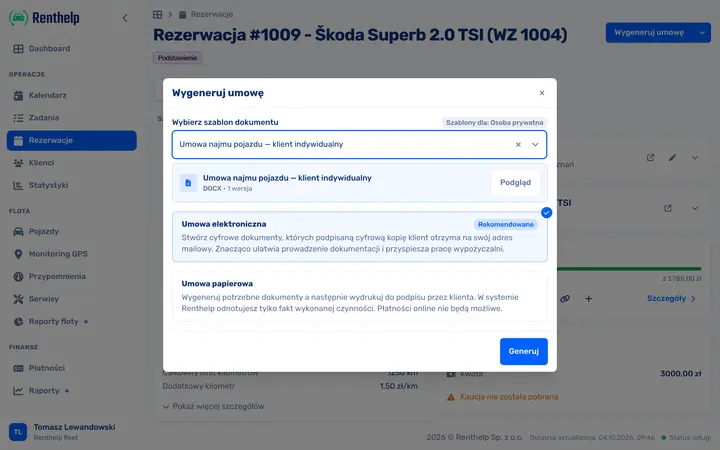
The default template has your rental company's logo and details, and in the body the deposit, deductible, mileage limit and rate for each extra kilometer. If you already have your own agreement, you can use it instead. Previous versions of the template stay in the history, and signed agreements do not change after you upload a new one.
Your own .docx template
You put tags in the file and Renthelp fills them with the rental details and signatures, then saves the agreement as a PDF. We enable this option on your account
Company and private individual
A separate template for business and private customers. When generating an agreement you choose which one to use
Terms and conditions under the agreement
You enter your terms once in the settings and the default template attaches them to every agreement. With the option turned on, the customer also signs the terms
Paper agreement
When the customer prefers paper, you print the agreement and handover reports, and mark the agreement as signed in Renthelp
Frequently asked questions
Is an agreement signed on screen valid?
A car rental agreement does not require any particular form, so it can also be concluded electronically. The customer signs by hand on the screen and, before signing, can confirm their phone number with an SMS code. Renthelp saves the signed agreement as a PDF and sends it to the customer. It is not a qualified electronic signature, so if you prefer paper, you choose a paper agreement.
What is the SMS code for?
The code confirms that the phone number in the agreement belongs to the person signing it. Renthelp sends it to the customer's number from the reservation, and the code is single-use and valid for an hour. If the customer does not have their phone with them, the employee can skip the authorization.
Can I use my own agreement template?
Yes. You upload a .docx file in which you put tags in place of the data, such as the customer's full name, license plate number, handover and return dates, price, deposit and a place for the signature. Renthelp fills them with the rental details and saves the agreement as a PDF. We enable this option on your account, so write to us. Until then, agreements are created from the default template with your logo and terms and conditions.
How does the customer get the documents?
By email, at the address from their details: first the draft agreement, then copies of the signed agreement, the handover and return reports and any addenda. The PDF files are password-protected. The password is the customer's PESEL number or, if it was not provided, their driver's license number. Photos of the car from the report are included in the message as links.
What if the customer prefers a paper agreement?
You choose a paper agreement. Renthelp generates the agreement and handover reports for printing, the customer signs them with a pen, and you mark in the reservation that the agreement has been signed. When the customer's details have no email address or phone number, the agreement can only be signed on paper.
What happens when the customer extends the rental?
An addendum is created whenever a signed reservation changes: the return date or location, the price, terms or extras. Renthelp then recalculates the quote, including the mileage limit. After the agreement is signed, you can no longer change the customer, the car, or the pickup date and location. You approve the change right away or send it to the customer for acceptance: they get an email and confirm it with an SMS code. The customer signs the addendum the same way as the agreement and gets a copy by email, and the reservation reminds you to have it signed before the car is returned.
How is excess mileage calculated?
The return report subtracts the odometer reading at handover from the reading at return. It multiplies the kilometers over the limit from the quote by the rate for each extra kilometer and adds the result to the reservation's payments as a mileage charge. The distance driven, excess mileage and surcharge are also in the report the customer gets.
Can I see agreements and handover reports before I create an account?
Yes. You can download a sample agreement and sample handover and return reports as PDFs on this page. The Renthelp demo, in turn, is a working system with the data of a sample rental company, with reservations that have signed agreements, handover reports and inspections. You get access after filling in the demo form.
Hand over your next car without paperwork
See agreements, handover reports and inspections on sample data in the demo, and generate your own once you create an account.
14 days free, no credit card required
Simple, predictable pricing See full pricing →